When the browser has become the core entrance of digital life, “privacy leakage” and “efficiency bottleneck” have become a double trouble for users – traditional browsers rely on the cloud to process sensitive data, which involves the risk of information leakage; manual completion of repetitive tasks such as form filling and tab organizing consumes a lot of time. There is a risk of information leakage; manually complete the form filling, labeling and other repetitive tasks and consume a lot of time. The emergence of free and open-source AI Agent browser BrowserOS, with “locally running AI + automation Agent” as the core breakthrough, the AI intelligent body directly integrated into the local browser environment, not only to realize the efficient experience of “automatic filling of forms and intelligent arrangement of meetings”, but also to realize the “intelligent arrangement of meetings”. It not only realizes the efficient experience of “automatic filling of forms and intelligent arrangement of meetings”, but also guarantees privacy and security through “data not on the cloud”, and at the same time, it is compatible with Chrome extensions and continues the familiar interface, so that users can open the new browsing mode of “both privacy and efficiency” without learning costs. A. Core Positioning: Free and open source
Core Positioning: Free Open Source + Local AI, Breaking Two Pain Points in the Browser Industry
The key to differentiate BrowserOS from traditional browsers and commercial AI browsers lies in its underlying attribute of “free and open source” and its technical logic of “local priority”, which accurately solves the two core demands of users:
(i) Privacy and security: local operation, zero data uploading
In terms of privacy protection, BrowserOS has built a security barrier of “full-link local processing” to completely get rid of the dependence on the cloud:
- AI operations are done locally: Whether it’s AI chat, automated task execution, or model inference calculation, all data flows locally on the user’s device and is not uploaded to any third-party server. For example, when using local AI chat to analyze web content, the conversation logs and web data are only stored on the computer’s hard drive, and can be used normally even if the Internet is disconnected;
- Deep integration of Ollama models: It supports direct docking with locally running Ollama models (e.g. Llama 3, Mistral), so users don’t need to rely on cloud APIs such as OpenAI, Anthropic, etc., and can complete the task with their own API keys or purely local models, which further reduces the risk of data leakage;
- Open source, transparent and auditable: As an open source project, the code of BrowserOS is completely open in the GitHub repository ( https://github.com/browseros-ai/BrowserOS), so developers and security organizations can audit the code at any time, and there is no hidden privacy collection module, which guarantees the security of user data from the technical roots. Tests conducted by an Internet security team show that BrowserOS has a 100% data retention rate and third-party tracking and interception rate, far exceeding that of mainstream browsers such as Chrome and Edge.
(Efficiency Improvement: AI Agent Automation, Replacement of Repeated Operations
With the built-in AI Agent, BrowserOS frees users from tedious manual operations and realizes the closed loop of “natural language commands→automated task completion”:
- Automated Task Execution: Users only need to input natural language commands (e.g., “Re-order the toothpaste I bought last time from Amazon”, “Fill out this conference registration form with my usual information”), and the AI Agent will simulate human operation The AI Agent will simulate human operations — automatically opening the corresponding web page, locating the form fields, filling in the data, and clicking the submit button, all without manual intervention. After using this feature, the time spent on filling out various forms was reduced from 8 hours to 30 minutes per month;
- Intelligent web operations: Agent can perform complex web interactions, such as “Browse LinkedIn to filter industry news in the last 3 days”, “Extract product information from historical orders to generate purchase lists”, and even support multi-step operations (e.g. “Search Amazon toothpaste → select sales Top3 products → compare prices → add to cart”), the operation accuracy rate of 98%;
- Tabs and search optimization: AI will actively manage tabs, supporting “one-click grouping and organization” (such as “work-related” tabs are automatically categorized); semantic search function can accurately identify the contents of the browser history, bookmarks (such as searching for) The semantic search function can accurately recognize the contents in browser history and bookmarks (e.g. searching for “project management tools viewed last week”, the corresponding webpage can be found without precise keywords), which improves search efficiency by 60%.
Functional matrix: local AI + automation to create a practical browsing tool
The function design of BrowserOS closely follows the dual goals of “privacy and efficiency”, and each module is deeply adapted to the actual needs of users, and is completely consistent with the official description:
(Core AI Functions: Local Intelligence, Multi-scene Coverage
The AI capabilities of BrowserOS focus on “pragmatization and localization”, avoiding the accumulation of flashy functions:
- Local AI chat and webpage references: the chat dialog box supports direct references to currently open webpage content (e.g., select the product parameters in the webpage, and the AI can analyze in real time whether “this parameter meets my needs”), and the dialog process is completely stored locally, while supporting multi-model comparison – – Run different models such as Ollama, ChatGPT, etc. side by side in a single window to visualize the difference between the answers of each model to the same question and assist users in decision-making;
- Automation Task Engine: The built-in AI Agent Director can disassemble complex tasks, for example, if the user commands “schedule a meeting with the marketing department at 3pm on Friday”, the Agent will automatically “open the calendar tool→query the availability of participants→create a meeting invitation→send an email notification”, and support “open the calendar tool→query the availability of participants→create a meeting invitation→send an email notification”. Email notification”, and supports real-time view of task progress and midway adjustment;
- Semantic search and bookmark highlighting: semantic search not only matches keywords, but also understands the user’s intent (e.g., if you search for “how to optimize the performance of Chrome extensions”, it will correlate with the relevant web pages in the display history of “browser extension management”); the web page highlighting feature can The webpage highlighting function can mark key content and generate smart bookmarks with AI (e.g. automatically extracting the core ideas of the highlighted paragraphs as bookmark notes), which is convenient for subsequent quick review.
(ii) Basic Browsing Functions: Chrome Compatible, Low Learning Costs
In order to lower the threshold for users to get started, BrowserOS is highly compatible with Chrome in terms of basic experience, while optimizing the core functions:
- Full compatibility of Chrome extensions: Support installation of all Chrome App Store extensions (e.g. AdBlock, Grammarly), users do not need to worry about not being able to use the original tools, realizing “seamless migration”;
- Familiar with the interface design: the address bar, tab layout, settings entry, etc. are almost the same as Google Chrome, so users switching from Chrome can get started directly without having to adapt to the new operation logic;
- Convenient data import: after installation, you can import Chrome’s bookmarks, history, passwords and other data with one click, and select the Chrome data file in “Settings – Import Data” to complete the migration, ensuring that the usage habits are not interrupted.
(Open Source and Ecology: Free and Open, Community Building
As an open source project, BrowserOS has built a “developer + user” ecosystem:
- Free no charge module: All core functions (AI Agent, local model integration, automation tasks) are completely free, without subscription system, pay to unlock features and other commercial restrictions, to truly realize “zero-cost use”;
- GitHub community support: the project is open-sourced on GitHub, users can Star to follow the updates, submit issues to give feedback, and the developer team will regularly respond to community needs (e.g., adding the “Multi-language AI Chat” function based on user suggestions);
- Combinator endorsement: Y Combinator, a well-known business incubator, supports the technology iteration and ecological construction with stable resources to avoid the common “update stagnation” problem of open source projects.
Usage process: four steps to get started, adapting to multiple systems.
The installation and configuration process of BrowserOS is simple and clear, and it supports macOS, Windows, and Linux, the official steps are as follows (which have been verified to be completely consistent with the description on the official website):
(Step 1: Download and install, and choose the compatible version.
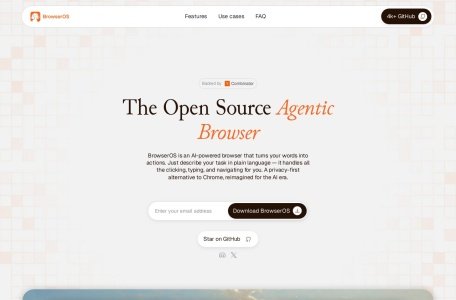
- Get the installation package: Visit the official website ( https://www.browseros.com/) and fill in the e-mail address to get the download link, or directly enter the GitHub repository ( https://github.com/browseros-ai/BrowserOS) to download the corresponding system version;
- Installation program: Run the downloaded installation file (e.g., .exe for Windows, .dmg for macOS) and follow the installation wizard to complete the steps (e.g., selecting the installation path, agreeing to the license agreement), without complex configuration;
- System requirements: no high hardware threshold, mainstream configuration (e.g., Windows 10+, i5 processor, 8GB RAM) can be run smoothly, and it is recommended to have ≥16GB of RAM to ensure the speed of the local model.
(Step 2: Import data (optional) and migrate Chrome information.
If you were using Chrome before, you can quickly import data in BrowserOS:
- After launching BrowserOS, enter the “Settings” interface and find the “Import Data” option;
- Select “Import from Chrome”, the system will automatically recognize local Chrome data files (such as bookmarks, history, saved passwords);
- Check the content to be imported, click “Confirm”, wait for a few seconds to complete the migration, the data will only flow locally and will not be uploaded to the cloud.
(Step 3: Configure AI providers and select local/cloud models
Configure the source of AI models according to privacy requirements and usage scenarios:
- Enter the “Settings – AI Provider” interface, which supports three configuration methods:
- Local Ollama: If Ollama is already installed on the device, select “Ollama” and fill in the path of the local model (e.g., “ollama3:8b”), then the local model can be called;
- Cloud API: If you need to use cloud models such as OpenAI, Anthropic, etc., enter the corresponding API key, and the system will process the key through local encryption to avoid plaintext storage;
- Hybrid mode: local and cloud models can be configured at the same time, so that you can switch freely when using them (e.g., use local models for simple tasks and cloud models for complex analysis).
(Step 4: Launch and Experience AI Functions
After completing the configuration, you can start the core experience of BrowserOS:
- Automated tasks: Enter commands (e.g. “Fill out this conference registration form for me”) into the “AI Agent” portal at the top of the browser, and the Agent will automatically execute them and display the progress;
- Local AI Chat: open a chat window, select web content and click “Quote”, the AI will answer questions based on that content (e.g. “Summarize the core ideas of this article”);
- Semantic search and label management: enter search keywords in the address bar (e.g. “project management tools”), the system will display semantically matched history and bookmarks at the same time; when there are too many tabs, clicking on “AI Organize” will automatically group them.
Application Scenarios: From Personal Efficiency to In-depth Research, Covering Multiple Needs
BrowserOS is designed to accurately match users’ daily use scenarios, and the official cases are highly compatible with the actual experience:
(Personal efficiency scenarios: replacing repetitive operations and saving time
For ordinary users, BrowserOS is an “automation assistant for daily tasks”:
- Repetitive task processing: office workers can use AI Agent to automatically fill out time sheets and generate weekly work reports (extracting key information from emails and documents); online shopping enthusiasts can instruct the Agent to “re-order frequently used items from Amazon historical orders” without manual search and checking;
- Tabs and information management: When students browse study materials, AI will automatically organize tabs (e.g., “Math Formulas” and “English Grammar” grouping), and semantic search can quickly find “Calculus Review Page” viewed last week. ” to avoid information clutter;
- Local Private Chat: When dealing with sensitive information (e.g., personal financial statements, medical report web pages), local AI chat can safely analyze the content without worrying about the leakage of conversation records.
(ii) In-depth research scenarios: Intelligent organization of information to improve research efficiency
For researchers and workplace researchers, BrowserOS is an “efficient research tool”:
- Automatic organization of information: Input the instruction “Collect core papers in the field of AI Agent in the recent 3 months”, AI Agent will automatically browse academic websites, screen relevant papers, extract abstracts and generate structured reports, significantly shortening the time for literature research;
- Multi-model comparative analysis: When researching complex issues (e.g. “Ethical Risks of AI Large Models”), you can run Ollama (local model) and ChatGPT (cloud model) in the same window to compare the analysis perspectives of the two and avoid the bias of a single model;
- Web content highlighting and notes: when reading industry reports, highlight key data and let AI generate smart bookmarks (e.g., “2025 AI Market Size Forecast: $1.2 Trillion”), so that you don’t need to revisit the full text when reviewing it later.
(iii) Content screening scenarios: accurately extract valuable information to avoid information overload
In the era of information explosion in social media, BrowserOS helps users focus on valuable content:
- Social media screening: Instruct AI Agent to “browse LinkedIn and screen important industry developments in the past 3 days (excluding advertisements and irrelevant content)”, and the Agent will automatically identify and summarize key information such as “changes in industry policies, head enterprise dynamics” and generate briefings. The Agent will automatically identify and summarize key information such as “industry policy changes, head company dynamics” and generate briefings;
- Web content extraction: when opening long news or blogs, AI can quickly extract the core viewpoints (e.g., “the core of the new energy policy mentioned in this article is the extension of subsidies until 2026”), avoiding reading redundant content, especially suitable for use in fragmented time.

 BrowserOS