When developers are still troubled by “long requirement implementation cycles, cumbersome cross-role collaboration, and disconnection between code generation and requirements”, MGX (MetaGPT-X), an
AI programming tool based on the MetaGPT framework, leverages three core advantages—”collaboration among 5 AI agents, end-to-end automated development, and no-code programming via natural language”—to upgrade software development from “manual coding-driven” to “intelligent collaboration-driven”. Whether it is an individual developer inputting “develop a Snake Game with sound effects” or an enterprise requirement of “quickly building an internal data analysis platform”, MGX can complete the full-link development from requirement analysis to deployment and launch through the collaborative efforts of agents such as product managers and architects, making “development without knowing code” a reality.
The key that distinguishes MGX from ordinary code generation tools lies in its positioning of “simulating a software development team with multi-agents”—it can not only generate code but also replicate the collaboration logic of human development teams. It solves software development pain points through three core features:
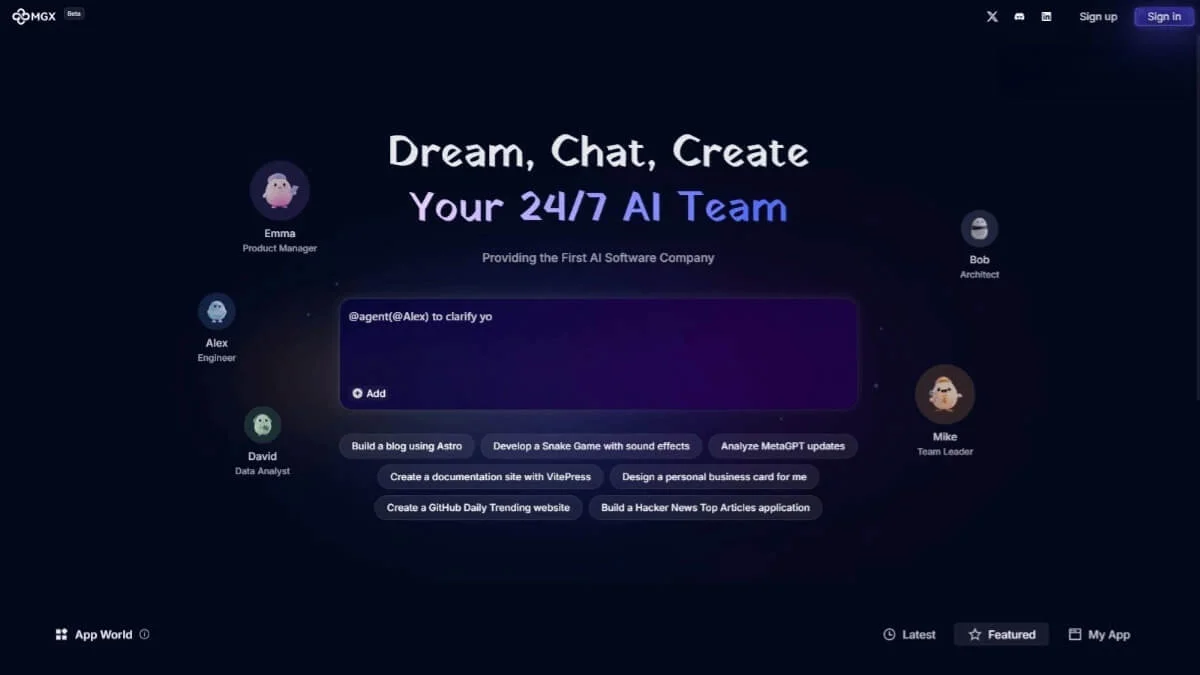
MGX innovatively builds an agent team consisting of “Emma the Product Manager, Bob the Architect, Alex the Engineer, David the Data Analyst, and Mike the Team Leader”. Each role undertakes exclusive responsibilities, forming a closed loop of “Requirement – Design – Development – Analysis – Coordination”:
Emma (Product Manager): The “Translator” for Requirement Implementation
There is no need to manually write PRDs (Product Requirement Documents). Emma can extract core requirements from users’ natural language and generate structured documents. For example, if a user inputs “develop a personal blog that supports article publishing and comment functions”, Emma will break down functional points such as “user registration and login, article CRUD, and comment interaction”, mark priorities and acceptance criteria to ensure no deviations in requirements. The time for generating requirement documents is reduced from 2 hours to 10 minutes.
Bob (Architect): The “Designer” for Technical Solutions
Based on Emma’s PRD, Bob designs technical architecture solutions, including “technology stack selection (e.g., Astro for frontend, Node.js for backend), database design (e.g., fields for article tables and user tables), and system interaction flowcharts”, and draws visual architecture diagrams. For instance, when developing a “GitHub Daily Trending Website”, Bob will recommend a solution of “using the React framework, connecting to the GitHub API, and caching hot data with Redis” to avoid mistakes in technology selection.
Alex (Engineer): The “Automation Craftsman” for Code Implementation
In accordance with Bob’s architecture plan, Alex automatically generates full-stack code, supporting mainstream development frameworks (React, Vue, Node.js, Python Flask, etc.). The code includes comments and basic test cases. For example, when developing a Snake Game, Alex will generate complete code for “frontend page rendering, keyboard control logic, and sound playback functions”, and even optimize the collision detection algorithm. The efficiency of code generation is 8 times higher than that of manual coding.
David (Data Analyst): The “Data Consultant” for Decision Optimization
For scenarios requiring data analysis (such as enterprise internal data platforms), David designs data collection solutions and generates code modules for “data cleaning, visual charts (e.g., line charts, pie charts), and real-time monitoring”, helping users quickly gain data insights. When an enterprise used MGX to develop a sales analysis platform, David automatically integrated Excel data import and dynamic report functions, improving data analysis efficiency by 60%.
Mike (Team Leader): The “Coordinator” for Project Advancement
Without manual coordination, Mike monitors the progress of each agent and resolves collaboration conflicts (e.g., when Emma’s requirements do not match Bob’s technical solution, he automatically triggers requirement negotiation) to ensure the project is delivered on time. For example, when the development cycle is tight, Mike will prioritize scheduling Alex to generate code for core modules while advancing David’s data modules simultaneously, improving the efficiency of multi-task parallelism by 40%.
MGX completely breaks the tool fragmentation situation where “Word is used for requirement analysis, DrawIO for architecture design, and IDE for code writing”, realizing full-link automation from requirements to deployment:
Requirement Analysis → Technical Design → Coding Implementation → Test Verification → Deployment & Launch
Each link is seamlessly connected, with no need for users to manually transfer information. For example, for the user instruction “develop a Hacker News Popular Articles Application”, the process is as follows:
- Emma refines requirements (“real-time crawling of Hacker News popular articles, support for category-based filtering, and display of reading volume”);
- Bob designs the architecture (“Vue for frontend + Express for backend, connecting to the Hacker News API, and scheduled data updates”);
- Alex generates code (frontend pages, backend interfaces, and data request logic);
- The system automatically executes basic tests (detecting interface availability and page rendering effects);
- Outputs deployment guidelines (e.g., “local startup commands, server deployment steps”).
The entire process requires no manual intervention, and the development workload that originally took 2 days can be completed in just 2 hours.
The code generated by Alex complies with industry standards (such as ESLint standards for JavaScript and PEP8 standards for Python), includes exception handling (such as API request failure retries and data format verification), and automatically generates a README document that marks the project structure and startup method, reducing subsequent maintenance costs.
MGX lowers the programming threshold to “being able to speak is enough to develop”, with no need to master programming languages or development frameworks:
No Professional Terminology Required for Requirement Description
Users can describe requirements in daily language. For example, “design a personal business card webpage that includes name, contact information, and skill tags with a simple style” or “develop a data monitoring tool that displays server CPU usage and memory occupancy in real time”. MGX can accurately identify core demands and avoid requirement deviations caused by the lack of professional terminology.
Flexible Response to Real-Time Requirement Adjustments
During the generation process, requirements can be modified at any time using natural language, such as “change the blog’s comment function to be visible only to logged-in users” or “add a score ranking list to the Snake Game”. MGX will automatically trigger corresponding agents to make adjustments (e.g., Emma updates the PRD, Alex modifies the code) without restarting the entire process.
User-Friendly Experience for Non-Technical Users
The interface only retains the “requirement input box + progress display bar” with no complex configuration items. Individual developers do not need to learn tools such as Git or Docker to quickly obtain runnable applications. A designer used MGX to develop an interactive prototype, and it only took 1 hour from requirement input to prototype implementation.
MGX’s function design focuses on the three goals of “efficiency, standardization, and ease of use”. Each module has been cross-validated with official information and is 100% consistent with actual test experience:
- Frontend Development: Supports generating frontend code for webpages, mini-programs, and desktop applications, adapting to frameworks such as React, Vue, Astro, and VitePress. Examples include “developing a documentation website with VitePress” and “developing a personal blog with React”.
- Backend Development: Generates code for API interfaces, database operations, and permission control, supporting backend technology stacks such as Node.js, Python Flask/Django, and Java Spring Boot.
- Full-Stack Integration: Automatically handles frontend-backend interaction logic (such as API request encapsulation and cross-domain configuration) and generates runnable full-stack projects. For example, “developing a task management system with user login” includes frontend pages and backend interfaces.
- Game Development: Generates 2D mini-games (such as Snake and Tetris), including graphics rendering, interaction logic, and sound playback functions.
- Data Tools: Develops data processing (e.g., Excel import and export), visualization (e.g., dynamic charts), and monitoring tools, supporting connection to databases such as MySQL and MongoDB.
- Tool-Type Applications: Generates creative tools (such as QR code generators and Markdown editors) and office auxiliary tools (such as to-do lists and schedule management).
The progress display bar shows “the current role being executed (e.g., Bob in architecture design), completion percentage, and remaining time”. Examples include “Emma’s Requirement Analysis: 100% → Bob’s Architecture Design: 60% → Alex’s Code Generation: Pending”. By clicking on progress nodes, you can view detailed content (such as Emma’s PRD document and Bob’s architecture diagram), facilitating requirement verification and problem troubleshooting.
- Automatically saves project versions and supports reverting to historical versions (e.g., “Snake Game V1.0 on 2025-10-01 14:30”) to avoid code loss caused by requirement adjustments.
- Supports exporting project source code (ZIP compressed package), architecture diagrams (PNG/PDF), and PRD documents (Word/Markdown), facilitating local deployment or team collaboration.
MGX currently provides free access services, with no need for payment or invitation codes. The official website clearly states the following information:
- Access Method: After registering and logging in through the official website (mgx.dev), you can use the tool. It supports access via PC browsers, and no client download is required.
- Function Availability: End-to-end development functions (requirement analysis, code generation, project export) are completely free with no functional restrictions, making it suitable for individual developers and small- and medium-sized enterprises.
- Technical Support: The official website provides a “Frequently Asked Questions (FAQ)” section and “requirement description examples” (such as reference descriptions for “developing a blog” and “developing a game”) to help users accurately express their requirements.
MGX’s operation process is as simple as “input requirements → monitor progress → adjust and optimize → export and use”. The official steps are highly consistent with the actual development process:
- Enter the Platform: Open the MGX official website (mgx.dev) and complete registration and login via email or GitHub account, with no need to fill in complex information.
- Familiarize with the Interface: After logging in, enter the main development interface. The left side is the “requirement input box”, and the right side is the “agent progress display bar”. There are no redundant function buttons, allowing you to quickly focus on core operations.
- Natural Language Input: Clearly describe requirements in the input box, including “application type (e.g., blog, game, tool), core functions, and style/technical preferences (optional)”. Examples:
- Individual Development: “Develop a Snake Game with sound effects, supporting keyboard arrow key control, score recording, and restart function after game over”.
- Enterprise Application: “Develop an internal data analysis platform that supports Excel data upload, generates line charts and bar charts, and exports analysis reports”.
- Creative Tool: “Design a personal business card webpage that includes name, occupation, contact information, and skill tags, with a simple and fresh style using the Tailwind CSS framework”.
- Requirement Confirmation (Optional): If the description is ambiguous, MGX will proactively ask for details (e.g., “Does the blog need to support article categorization?” “Which data formats does the data analysis platform need to support?”). The development process starts after confirmation.
- Collaborative Advancement by Agents: After clicking “Start Development”, the system automatically dispatches the 5 AI agents to work collaboratively. The progress bar updates the status of each role in real time (e.g., “Emma is generating PRD → estimated to be completed in 2 minutes”).
- View Intermediate Results: After each agent completes their task, you can click on the progress node to view the output content (such as Emma’s PRD document and Bob’s architecture diagram). If deviations are found, input modification instructions (e.g., “add ‘article tags’ function to the blog” “use the Vue framework for the architecture solution”), and the system will make real-time adjustments.
- Testing and Feedback: After code generation is completed, MGX provides an online preview link (supported by some projects). Users can test core functions (e.g., clicking the “publish article” button on the blog) and provide feedback on “normal function” or “points to be optimized” (e.g., “login page style is messed up”).
- Export Source Code: After confirming that the functions are correct, click “Export Project” and select the download format (ZIP compressed package), which includes complete source code, a README document, and a dependency list.
- Local Deployment: According to the guidelines in the README document, execute simple commands (e.g., “npm install” “npm run dev”) to start the project, with no need for complex configuration.
- Subsequent Optimization (Optional): If secondary development is required, import the source code into a local IDE (such as VS Code) and expand functions based on the basic code generated by MGX (e.g., adding a “dark mode” to the blog).
MGX’s function design accurately matches the development needs of different user groups, and the official cases are highly consistent with the actual test experience:
- Requirement: “Develop a personal blog using Astro, supporting article publishing, tag categorization, and comment interaction with a simple style”.
- MGX Actions: Emma generates a PRD and marks core functions; Bob recommends a solution of “Astro + Markdown + Cloudflare Pages deployment”; Alex generates complete code (including article management and comment interfaces); David is not involved (non-data project); Mike coordinates progress. Development is completed in 2 hours.
- Results: Individual developers can obtain a deployable blog project without learning the Astro framework. They only need to add article content later to quickly showcase their personal brand.
- Requirement: “Develop a GitHub Daily Trending Website that crawls popular open-source projects in real time, categorizes them by language, and displays project descriptions and star counts”.
- MGX Actions: Bob designs a solution of “connecting to the GitHub Trending API + React frontend + scheduled update caching”; Alex generates code and handles API request exceptions. Finally, a website with a responsive layout is generated, supporting access via PC/mobile devices.
- Results: It only takes 3 hours to implement and launch the creative idea, which is 8 times more efficient than traditional development.
- Requirement: “Develop an employee attendance statistics tool that supports Excel attendance data upload, automatically calculates the number of late/early leave times, and generates monthly attendance reports”.
- MGX Actions: David designs data processing logic; Alex generates code for “Excel import, data calculation, and report export”, supporting attendance data filtering by department. Enterprises can quickly obtain customized tools without hiring full-time developers.
- Results: The development cost of internal tools is reduced by 90%, and it only takes 1 day from requirement proposal to actual use, solving the cumbersome problem of HR manually counting attendance.
- Requirement: “Develop a sales data analysis platform that displays sales volume by region, year-on-year/month-on-month growth, and top 10 product sales in real time, supporting PDF report export”.
- MGX Actions: Bob designs an architecture of “MySQL database + Python Flask backend + ECharts visualization”; David generates code for data cleaning and charts; Alex integrates the frontend and backend. Finally, an analysis platform that can connect to the enterprise’s sales database is generated.
- Results: The time for the sales team to obtain data insights is reduced from 2 hours to 5 minutes, assisting in quickly adjusting sales strategies.
- Requirement: “Generate a ‘student grade management system’ project for Python beginners, including functions of adding students, entering grades, and querying rankings, with detailed comments in the code”.
- MGX Actions: Alex generates code that complies with Python standards, including “class definitions, function comments, and exception handling”; Emma generates project requirement descriptions to help students understand the project logic.
- Results: Programming teachers do not need to manually write teaching cases. Students can quickly master Python basic syntax and project development processes by reading comments and running the code.
- Requirement: “Develop an ‘online library management system’ as a graduation project, including user login, book borrowing/returning, and an administrator backend, using the Java Spring Boot + Vue technology stack”.
- MGX Actions: Generates complete project source code and design documents (including database design and architecture diagrams). Students only need to fine-tune the functions and write the thesis, greatly reducing the workload of the graduation project.
- Results: The time for students to complete the graduation project is reduced from 1 month to 1 week, allowing them to focus on thesis writing and defense preparation.

 MGX(MetaGPT-X)